
Use Customize Design / Context > Background and Display Colors to change design background and display colors.
|
|
Use Customize Design / Context > Background and Display Colors to change design background and display colors. |
In addition to background color or fabric, display colors for stitches, needle points, object shapes, and grid are part of the colorway definition. Change them if the default display color is not visible against the current colorway. The Background and Display Colors dialog includes a Display Colors panel.
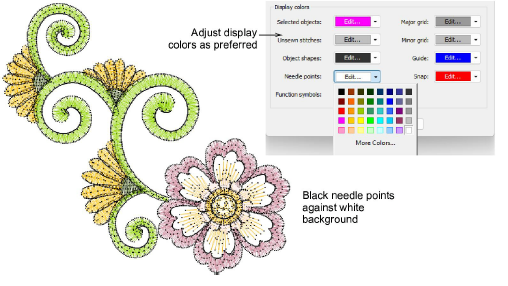
Adjust colors as required for:
|
Element |
Notes |
|
Selected objects |
Selected objects or stitches. |
|
Unsewn stitches |
Unsewn stitches as they appear when traveling through the design. |
|
Object shapes |
Object outlines as they appear when Show Shapes is activated. |
|
Needle points |
Needle points as they appear when Show Needle Points is activated. |
|
Function symbols |
Symbols such as trims and tie-offs as they appear in stitch view. Use in conjunction with the Show Functions toggle. |
|
Major grid |
Depending on the colorway, you may need to adjust grid display colors in order to view them against the background color. |
|
Minor grid |
|
|
Guide |
Similarly, adjust as necessary to suit current colorway. |
|
Snap |
Add-ons
Get started & learn faster with...






