
Objects can be duplicated rather than copied. When an object is duplicated, it is not copied to the Clipboard. This leaves the Clipboard free for other objects. Select the object/s to duplicate. Various duplication options become available – the Context toolbar, the Edit menu or the popup menu.
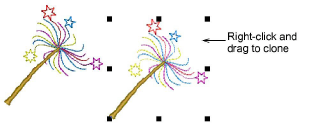
The easiest way to duplicate a selected object is to click the Duplicate tool or simply press Ctrl+D. This copies the object to the same position where it can be dragged to another location. The Duplicate with Offset option allows you to create step-repeat offset objects. As an alternative to duplication, the ‘quick clone’ feature can be used to copy selected objects.
Add-ons
Get started & learn faster with...


