
Use Context > Underlay to apply or exclude automatic underlays to new or selected objects. Right-click for settings.
|
|
Use Context > Underlay to apply or exclude automatic underlays to new or selected objects. Right-click for settings. |
The Underlay tool is a toggle button that allows you to apply automatic underlay to new or selected objects. Underlay is deselected by default.
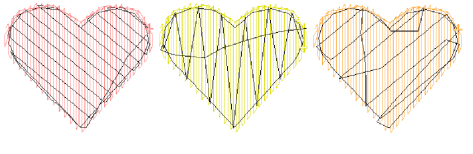
In addition to the basic underlay stitch types – Center Run, Zigzag, Edge Run, and Tatami – the software also provides a selection of underlay combinations such as Double Zigzag, Center Run + Zigzag, etc. This allows you to apply dual underlays to design objects.
Add-ons
Get started & learn faster with...


