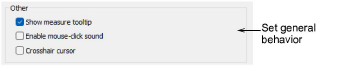
Miscellaneous other system settings are available via the User Interface Settings > General tab.
These options include:
|
Option |
Purpose |
|
Show measure tooltip |
Shows length and angle in a tooltip when measuring distances on screen. See also Workspace setup & measurement. |
|
Enable mouse-click sound |
Enables beeping sounds made by the software in response to mouse clicks and pressing <Enter> or <Spacebar> keys while digitizing. |
|
Crosshair cursor |
Changes the default cursor pointer to crosshairs for more precise positioning. It is best used together with the grid. |
Add-ons
Get started & learn faster with...






