
Click View > Show Hoop to show or hide hoop. Right-click for settings.

Click Customize Design / Context > Machine & Hoop Options to change machines, set up hoop lists, and define custom brands and hoops.
Hatch Embroidery supports most domestic machine brands and models. However, if you have a different machine, you may need to set up a custom brand and hoop list.
1Click the Machine & Hoop Options icon. Or right-click the Show Hoop icon. The Embroidery Settings > Machine & Hoop tab opens.
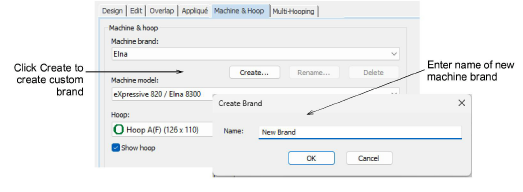
2Click the Create button. The Create Brand dialog opens.
3Enter a name for your new machine brand and click OK. The Add/Remove Hoops dialog opens.
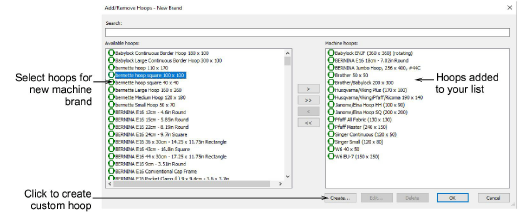
Tip: Green hoop icons represent single-needle hoops while blue icons represent multi-needle hoops.
4Select hoops you want to associate with the new brand from the Available hoops panel. Use the controls to transfer them to the Machine hoops panel and click OK.
Note: Once your new brand is saved, it can be edited or removed via the available buttons in the Machine & Hoop tab.

Add-ons
Get started & learn faster with...






