
Use Output Design / Standard > Send to Device/Machine to send the current design to a named embroidery machine via WLAN.
|
|
Use Output Design / Standard > Send to Device/Machine to send the current design to a named embroidery machine via WLAN. |
Once you have configured one or more embroidery machines and/or EmbroideryConnect devices on your network, you can send designs to any named device from a computer running Hatch Embroidery on your local Wi-Fi network. No USB drives, no manual file copying – just send your designs straight from computer to machine over WLAN. Hatch Embroidery allows you to wirelessly transfer embroidery designs to WLAN-enabled machines and EmbroideryConnect devices via the EmbroideryHub application.
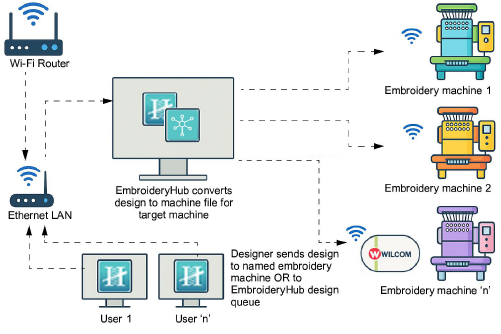
Note: Every design sent over the network is protected with industry-standard encryption, ensuring your work stays safe during transfer. Only machines configured in EmbroideryHub can receive your designs.
Add-ons
Get started & learn faster with...






