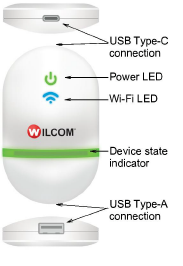
EmbroideryConnect is designed for Hatch Embroidery users who want to send designs from PC directly to a nominated machine. Most modern embroidery machines like Tajima, Barudan, Happy, ZSK, Ricoma and SWF, can read files from a standard USB memory stick. With EmbroideryConnect, there is no need for serial ports, different interface methods, or machine cabling. A separate device is needed for each embroidery machine on the network.
Device features include:
|
Item |
Description |
|
EmbroideryConnect device |
The device itself is small and compact. It can plug directly into an embroidery machine USB port via USB cable. |
|
USB Type-C connection |
USB Type-C connection at top to connect device to computer or embroidery machine. |
|
USB Type-A connection |
Used for USB barcode scanner. |
|
Device state indicator |
The device displays basic status information. See Send designs to EmbroideryConnect device for details. |
|
Power from USB |
No separate power supply needed – power is drawn from USB port. |
|
Mounting strips |
The EC device comes with mounting strips to attach it to the target machine. |
Note: Visit the Wilcom Support Center for a current list of compatible machines.
Add-ons
Get started & learn faster with...






