
Use Graphics Digitizing > Rectangle to digitize rectangle or square objects. Press <Ctrl> for a square. Use floating toolbar for rounded corners.
|
|
Use Graphics Digitizing > Rectangle to digitize rectangle or square objects. Press <Ctrl> for a square. Use floating toolbar for rounded corners. |
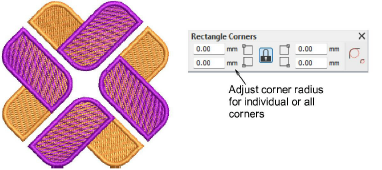
Rounded corners may appear in many different logos and designs. To achieve the result manually is time-consuming, as is editing. When the Rectangle/Square digitizing tool is selected, or an object created with this tool, a new Rectangle Corners floating toolbar appears. This gives you independent or group control over each corner radius.
Add-ons
Get started & learn faster with...






