
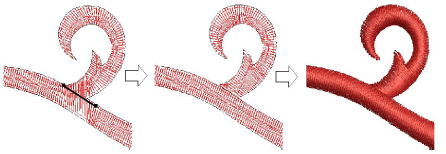
Use Lettering / Monogramming or Edit Objects > Knife to cut objects along a digitized line, preserving stitch settings and colors.
|
|
Use Lettering / Monogramming or Edit Objects > Knife to cut objects along a digitized line, preserving stitch settings and colors. |
Depending on your product level, the Knife tool may be available in your Edit Objects toolbox. It can, for instance, be useful when editing artwork converted to embroidery with auto-digitizing methods. For ‘power users’ who use the tool regularly, a new shortcut key <Ctrl+Shift+K> is available to activate the Knife tool .
Add-ons
Get started & learn faster with...






