
Use Context > Gradient Fill to apply or exclude Gradient Fill effect to new or selected objects. When turned on, stitch spacings vary between dense and open fill. Right-click for settings.
|
|
Use Context > Gradient Fill to apply or exclude Gradient Fill effect to new or selected objects. When turned on, stitch spacings vary between dense and open fill. Right-click for settings. |
The Gradient Fill feature varies stitch spacing between dense and open fill, producing gradient and shading effects which are difficult to achieve manually.
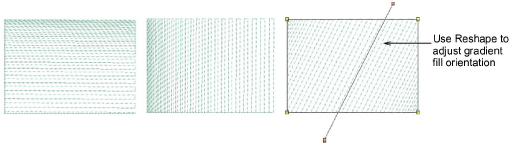
Two new gradient profiles have been added to the Gradient Fill Profile Gallery, and the names have been changed to better reflect the stitched results.
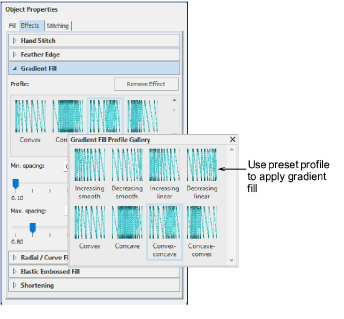
Profile 1 = Increasing smooth
Profile 2 = Decreasing smooth
Profile 3 = Increasing linear
Profile 4 = Decreasing linear
Profile 5 = Convex
Profile 6 = Concave
Profile 7 = Convex-concave
Profile 8 = Concave-convex
Add-ons
Get started & learn faster with...






