
Use Edit Objects > Object Properties to show Object Properties docker. Use to preset properties for new embroidery objects or adjust properties for selected embroidery objects.
|
|
Use Edit Objects > Object Properties to show Object Properties docker. Use to preset properties for new embroidery objects or adjust properties for selected embroidery objects. |
Hatch Embroidery 4 introduces enhanced control over automatic connectors, tie-ins, tie-offs, and trims, helping you produce cleaner, more efficient stitch-outs with less manual adjustment.
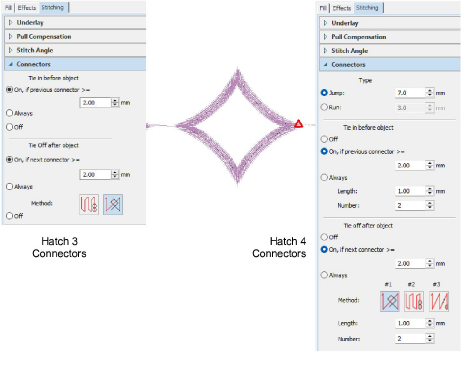
You can now more precisely define how objects are connected, choosing between jump or run connectors and setting thresholds that determine when tie-ins, tie-offs, and trims are applied. Automatic tie-in and tie-off options have been refined to give better control over stitch security while minimizing visible stitching, with multiple methods available to suit different object types and densities.
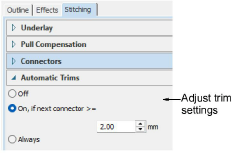
Automatic trims can also be configured based on connector length, allowing you to reduce unnecessary trims while avoiding visible travel stitches. Together, these improvements provide greater flexibility in balancing stitch quality, machine efficiency, and visual results across a wide range of embroidery workflows.
Add-ons
Get started & learn faster with...






