Use Edit Objects > Sequence >> to open the Sequence docker. Click again to close. Also available via Windows > Dockers menu.
|
|
Use Edit Objects > Sequence >> to open the Sequence docker. Click again to close. Also available via Windows > Dockers menu. |
Embroidery objects form a stitching sequence. They are stitched in order of creation. The Sequence docker provides an easy way to reposition objects in the preferred sequence.
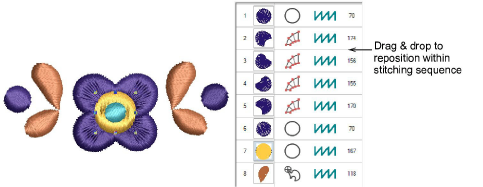
Establish stitching order so that foreground objects are sewn after background objects.
Click to select the object you want to sequence. Hold down Ctrl to select multiples.
Use the buttons on the toolbar to reposition the selection.
Alternatively, drag-and-drop to the required position. The list will scroll automatically.
Remember to apply Closest Join to selected objects after editing. It is available from the Edit menu or by pressing J.
Add-ons
Get started & learn faster with...