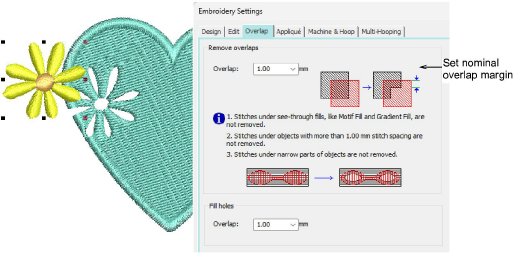
Use Edit Objects > Remove Overlaps to remove stitches that are covered by the selected objects. Overlap value can be changed in the Overlap tab of Embroidery Settings dialog.
|
|
Use Edit Objects > Remove Overlaps to remove stitches that are covered by the selected objects. Overlap value can be changed in the Overlap tab of Embroidery Settings dialog. |
Use the Remove Overlaps tool to remove underlying layers of stitching in overlapping objects. This helps to reduce the stitch count and prevent a build-up of stitches where they are not needed.
Tip: You can use an entire design as a cutter excluding objects, such as borders or details, less than a certain width.
Add-ons
Get started & learn faster with...