
Use Edit Objects / Select > Reshape to reshape an object outline, edit stitch angles, or adjust entry and exit points.
|
|
Use Edit Objects / Select > Reshape to reshape an object outline, edit stitch angles, or adjust entry and exit points. |
The Reshape tool is important in Hatch Embroidery. Use it whenever you want to change object shapes. Use it also to edit stitch angles as well as entry and exit points. Control points appear together with the Reshape Views toolbar. This makes it easy to selectively view control points – reshape nodes, stitch angles, and entry/exit points.
Select an object and click Reshape. Control points appear together with the Reshape Views toolbar.
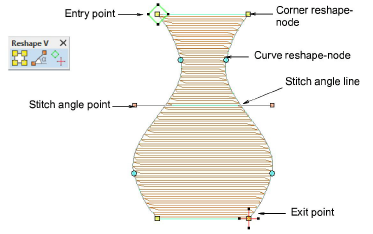
Tip: Most control points can be added, deleted, or moved. Corner and curve points can be swapped. Entry/exit points, however, cannot be deleted.
Use the Reshape Views toolbar to selectively display control points.
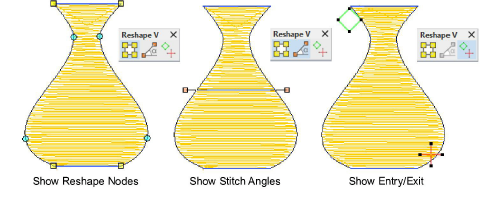
Show reshape nodes: Use hotkey combination Alt+N to toggle.
Show stitch angles: Use hotkey combination Alt+A to toggle.
Show entry/exit points: Change stitch entry and exit points of individual objects.
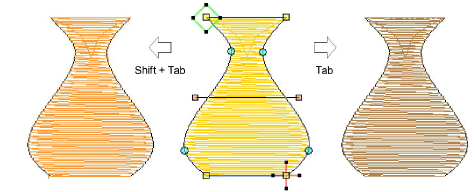
To view next or previous objects, press Tab or Shift+Tab keys. Any changes to objects are confirmed.
Add-ons
Get started & learn faster with...






