
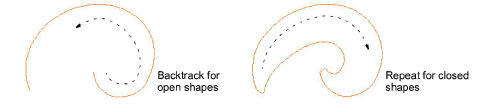
Use Digitize > Backtrack to reinforce an outline, stitching it in the reverse direction to the original.

Use Digitize > Repeat to duplicate an outline in the same direction. Normally used with closed shapes.
Use Backtrack and Repeat to reinforce outlines while specifying the direction of the stitching.
1Select the object (or objects) to reinforce. Both tools are enabled when Single Run Lines, Triple Run Lines, or Satin Lines are selected.
2Choose the best tool for the task, depending on whether you have chosen an open or closed object. Generally:
3The object is duplicated and placed on top of the original. It is the same color and is positioned after it in the stitching sequence.
4Check that the object has been duplicated by the following means:
Check the stitch count in the Status Bar.
Use Stitch Player or travel through the stitches.
Backtrack stitches in reverse direction to the original. It is typically used to make run stitch outlines thicker without creating unwanted connecting stitches.
Repeat duplicates the original stitch direction and is typically used with closed shapes. If you use it with open shapes, a connecting stitch is inserted from the end to the start of the object. This will require trimming.
If you use Backtrack with an object that has travel runs and/or underlay, these stitches will stitch on top in the second pass – the ‘backtrack pass’. Select the second pass and turn off underlay.
For best stitch results avoid using Backtrack on objects with internal travel runs.
Add-ons
Get started & learn faster with...






