
Use Context > Always Tie-Off & Trim to trim connectors. When turned on, connectors will always be tied off and trimmed. Otherwise, the software will decide when to trim.
|
|
Use Context > Always Tie-Off & Trim to trim connectors. When turned on, connectors will always be tied off and trimmed. Otherwise, the software will decide when to trim. |
Hatch Embroidery generates connecting stitches both within and between objects, based on embroidery objects. You can use the Always Tie-Off & Trim tool on the Context toolbar to force the use of trims when you don’t want connecting stitches to appear. For instance, lettering objects often contain connecting stitches between letters. In the sample below, the first object uses default settings and includes connecting stitches between letters ‘L_u_b_l_i_c_k’. The second object includes trims between each letter as indicated by the small triangles.
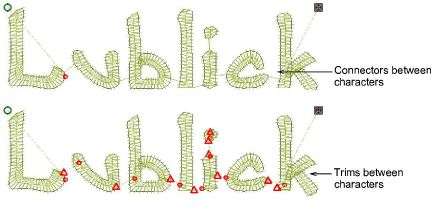
You can change connector settings for a whole design or selected objects. Sometimes, for instance, you may want to insert a jump as a connector between embroidery objects. Hatch Embroidery inserts Tie-off and Trim functions which forces the machine to cut the connecting thread. The easiest way to do so is to select the first object and click Always Tie-Off & Trim on the Context toolbar.
Add-ons
Get started & learn faster with...






