
Use Edit Objects > Object Properties to show Object Properties docker. Use to preset properties for new embroidery objects or adjust properties for selected embroidery objects.
|
|
Use Edit Objects > Object Properties to show Object Properties docker. Use to preset properties for new embroidery objects or adjust properties for selected embroidery objects. |
If you are using a machine with an automatic trimmer, the trim function causes the thread to be cut after a tie-off. You can adjust connector settings to automatically add trims, or add them yourself.
1Click the Object Properties icon and select the Stitching > Automatic Trims tab.
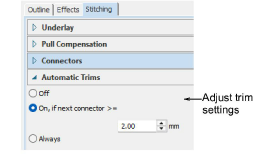
2In the Trim After panel, select a trim option:
|
Setting |
Function |
|
Off |
No trims are inserted. This feature is useful if trimming causes your machine to slow down, or the needle to lose the thread. You can either add trim functions yourself, or trim the final embroidery by hand. |
|
Trim if next connector >= |
Trims are inserted if connectors exceed the specified length. |
|
Always trim |
Trims are inserted after the object. |
Tip: Usually, connectors shorter than 3 mm are not visible on the final embroidery. You may sometimes require a smaller value – e.g. if the thread color contrasts with the background color.
Add-ons
Get started & learn faster with...






