
Use Manage Designs > Transfer Selected Design to transfer the design selected to the default Machine Folder.
|
|
Use Manage Designs > Transfer Selected Design to transfer the design selected to the default Machine Folder. |
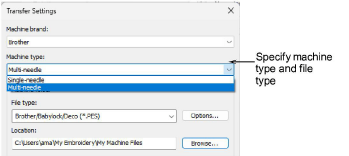
Hatch Embroidery provides a method of connecting to machines that appear as removable media in MS Windows®. Alternatively, some machines connect via a third-party app and use a designated network folder. Once set up, you can send a design to this folder with a single click. The first time, you will be prompted to specify your machine type and file type.
Tip: Using the Output Design toolbox you can output embroidery designs in a variety of ways – by printing as worksheets, as appliqué patterns, color sequence, or as thread charts.
Add-ons
Get started & learn faster with...






