
Use Edit Objects > Object Properties to show Object Properties docker. Use to preset properties for new embroidery objects or adjust properties for selected embroidery objects.
|
|
Use Edit Objects > Object Properties to show Object Properties docker. Use to preset properties for new embroidery objects or adjust properties for selected embroidery objects. |
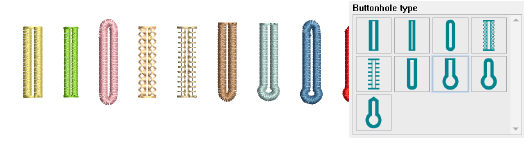
Buttonhole types can be changed at any time. They are simply properties of a buttonhole object. Other properties include ‘slit length’ which can be adjusted to suit button size. In buttonhole embroidery, especially satin-stitched buttonholes, ‘bead stitch spacing’ refers to how closely the small diagonal stitches, called ‘beads’, are placed along the cut edge of the buttonhole. These stitches protect the raw edge and create that dense, corded finish you see on high-quality garments.
1Double-click a buttonhole object to open Object Properties.
2Click to select a preferred type from the gallery.
3Adjust slit length according to your button size.
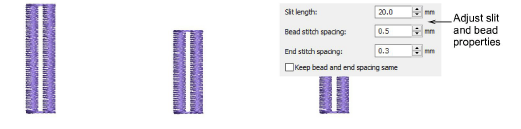
4Adjust bead stitch spacings as preferred. Different values are available for different buttonhole types. For some, independent settings are available for bead stitch and end stitch spacing.
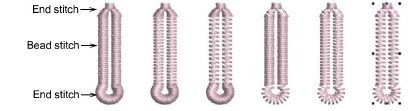
Tight bead stitch spacing creates a smooth, corded effect. Good for fine fabrics (silk, cotton shirting) and high-stress buttonholes (coats, cuffs).
Wider spacing produces a lighter, more flexible, less bulky effect. Better for thicker fabrics or decorative uses.
Generally, stitches should sit just close enough that the fabric edge doesn’t show through, but not so close that they pile up into a ridge.
On domestic sewing machines, the stitch length setting controls bead spacing:
For fine fabrics: 0.3–0.5 mm spacing is common.
For medium fabrics: 0.5–0.7 mm.
For heavy fabrics: up to 1 mm can work (to prevent stiffness).
Sometimes a cord is laid along the slit, and the bead stitches are worked over it. This makes the bead spacing appear tighter and adds durability.
There are situations where independent control of end stitch spacing in buttonholes is useful. End stitches – the ‘bar-tacks’ at the top and bottom – take a lot of stress and also determine how neat the buttonhole looks.
Add-ons
Get started & learn faster with...






