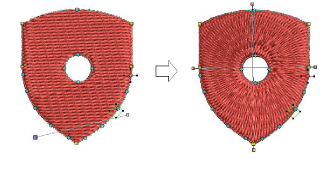
You can add multiple stitch angles with the Add Stitch Angles tool.
1Select a closed fill object. Click to mark pairs of stitch angle points.
2The stitch angle lines must cross the fill area without intersecting.
3Press the Enter key to apply stitch angles.
4You can continue to adjust stitch angles in Reshape mode.
Multiple stitch angles can be changed to a single stitch angle by applying the Remove Stitch Angles tool.
Stitch angles can overlap holes within objects.
Press the Backspace key while digitizing to remove the last reference point.
Press the Escape key while digitizing to cancel all points.
Press the Escape key again to deactivate the tool.
Add-ons
Get started & learn faster with...


