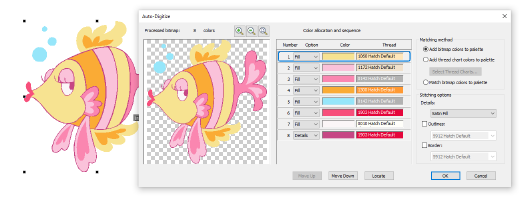
For more control over object conversion, use the Auto-Digitize Embroidery method.
Scan or load an image, and edit and process as necessary.
Size the image in the Context toolbar to approximate dimensions.
Select the image and click Auto-Digitize Embroidery. If you have not yet processed the image, you will be prompted to do so.
Image colors are automatically classified as fills or details, or omitted altogether.
Use the droplists to reassign colors as preferred.
Decide where you want colors to appear in the stitching sequence. Use the ‘Move’ buttons to re-sort as preferred. Fills should always be stitched first, outlines and details, last.
Add-ons
Get started & learn faster with...


